Hey folks 👋
Last month, a colleague forwarded me a compliance module that her team had designed with their shiny new “specialised AI tool for L&D”. It looked great: clean visuals, logical structure, a quiz at the end that read plausibly.
But something was nagging at her: “Is this design actually good? Would you sign off on this?”
So, I checked the content of one of the models that AI had designed against the source documents that her team had given the AI. On my first pass, I found:
-
The tool had invented a regulatory timeline that simply doesn’t exist.
-
The tool invented and added at least one one procedural step to a critical procedure.
-
There were multiple examples of confident-sounding statistics which had no traceable source.
TLDR: Regardless of the design quality (more on this later), this training should not be signed off because – first and foremost – it wasn’t compliant.
That experience made me wonder how widespread this problem is. And the short answer is: very.
Almost all of us are using both specialised and generic AI tools in our day to day L&D work, but most of us aren’t sure we can trust what they produce. In a survey a ran last year with Synthesia, “accuracy concerns” were the second most common AI-related concern among L&D teams, after security. All of this left me asking: how “specialised” are AI tools for L&D really — and what do we need to do to make sure what they and the general LLMs we use daily generate is actually reliable?
So I ran the same set of tests across the most-marketed “specialised AI tools for L&D”, plus a general-purpose LLM as a baseline. In this week’s blog post, I share what I learned, and what it means for how to work with AI in your day to day work.
Let’s go!
For each tool in the set, I ran three inputs designed to stress-test different failure modes:
→ Input 1 — A clean, well-structured source. A real 10–15-page source document from a client organisation. Proper structure, substantive content — the kind of source you’d hand an AI tool on a good day. Brief: “Turn this into a 20-minute module.”
→ Input 2 — A thin source doc. Six to eight bullet points on a topic the AI would also know from its general training. Brief: “Create a complete course on [topic].” This tests what the tool does when the source isn’t enough to build from on its own — does it flag the gap, or quietly fill it in from general knowledge?
→ Input 3 — A wrong-fit brief. A procedural task that shouldn’t be a course — like “build a 30-minute module on how to submit an expense claim.” The right answer here is a job aid, not 30 minutes of training. This tests whether the tool has any judgment about whether a course is even the right response.
Then, for each tool, I asked three questions:
🙋🏽♂️ Q1 — Is it building the right thing? Does it push back when the brief is wrong — or does it build whatever I ask?
🙋🏽♂️ Q2 — Is it building well from what I give it? Does it stick to the source material, or does it make things up to fill the gaps?
🙋🏽♂️ Q3 — Is it designing the way research says we should? Does the output include recall tasks, genuinely hard moments, and prompts to apply the learning on the job — or is it all multiple-choice quizzes at the end?
Each question scored 0–3. Same three inputs for every tool. Same three questions. Same scoring.
A note on method: The scores and observations below come from my own testing: reading marketing claims, looking at product documentation, and running the same briefs through several different specialised AI tools and general-purpose LLMs to see what each one produced. It isn’t a full controlled study against a single named model. Full controlled testing is ongoing and will be published separately; what I’m giving you here up front is the method so you can test your tools tomorrow.
Here’s the headline finding, and it’s a claim about the category — not about any one product: the claim of “specialisation” made by many of these tools is a stretch.
Across three inputs and three questions, the dedicated “AI tools for L&D” and general-purpose LLMs that we use most ended up in a surprisingly narrow band:
→ On Q1 (is it building the right thing?), the dedicated tools and the general LLM tied.
→ On Q2 (is it building well from input?), they were within one point of each other.
→ On Q3 (is it designing the way research says we should?), the general LLM actually scored higher than one of the dedicated tools.
Let me walk through what I found in each case.
I gave every tool Input 3 — the wrong-fit brief: “build a 30-minute course on how to submit an expense claim.” The right answer here is a job aid, not a course. Nobody needs 30 minutes of training to fill in an expense form.
Every single tool built the 30-minute course.
The dedicated tools didn’t even raise the question. The general LLM occasionally added a sentence like “you might consider whether this needs to be a course” — then built it anyway.
Scores ranged from 0/3 (built it without comment) to 1/3 (flagged a concern, then built it regardless). Not a single tool refused the brief or proposed an alternative intervention.
What this tells us: if you’re relying on the tool to spot a flawed brief, you’re relying on something it’s not built to do. That job is still yours.
This is the most important finding, because it’s the one with the biggest risk attached for L&D.
I gave the general-purpose LLM Input 2 — eight bullet points on data subject rights under UK GDPR, the kind of scribbled summary a subject matter expert might put in an email — and asked it to build a complete 25-minute module for new joiners.
The output looked fine. Five sections, eight learning objectives and an end-of-module quiz. It read well and – of course – it sounded confident throughout.
Then I picked 10 specific claims from the output and checked each one against the bullet points I’d given the AI:
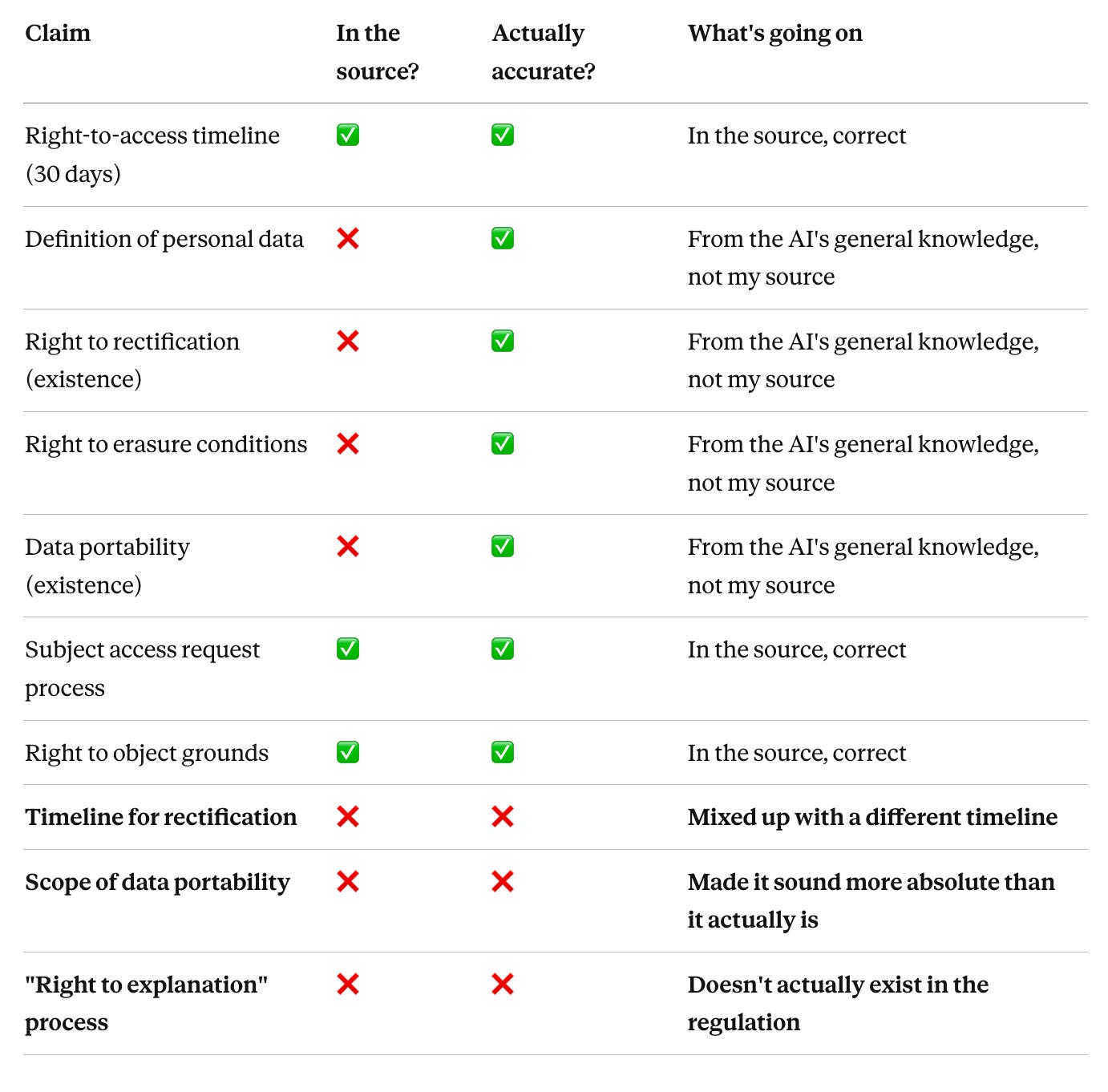
Three out of ten claims were wrong in ways that really matter. Four more couldn’t be checked against the source at all — they came from the AI’s general training, not from what I’d given it. Accurate enough, probably. But not something a client could point to and say “that came from our source documents” in a regulator’s review.
And the dedicated tools produced the same pattern on the same input. One was worse than the general LLM — it generated whole sections of regulatory detail that weren’t in the source at all.
Scores ranged from 1/3 to 2/3 across every tool. The specialisation didn’t protect against this — if anything, the dedicated tools were more confident in their output, which made the made-up parts harder to spot.
What this tells us: if you’re not checking AI output against your source every single time, you’re shipping content your source doesn’t actually support. That’s a compliance risk in regulated contexts and a credibility risk everywhere else.
Across all three inputs, every tool I tested produced content that looked like learning — chunks, activities, quizzes — but wasn’t optimised for learning. Some common patterns:
-
Activities were almost entirely multiple-choice recognition.
-
Quizzes came at the end of modules, rather than being woven throughout.
-
Cognitive load was largely unmanaged.
-
The default instructional strategy was knowledge transfer, i.e. ~90% content, 10% activity.
Scores ranged from 0/3 to 2/3. The general LLM scored higher here than one of the dedicated tools — which shouldn’t be possible if the specialisation were real…
What this tells us: if you ship what the tool gives you without adding the learning-science layer yourself, you’re shipping content that completes well and teaches very little.
If we pull everything together, this is the emerging picture:
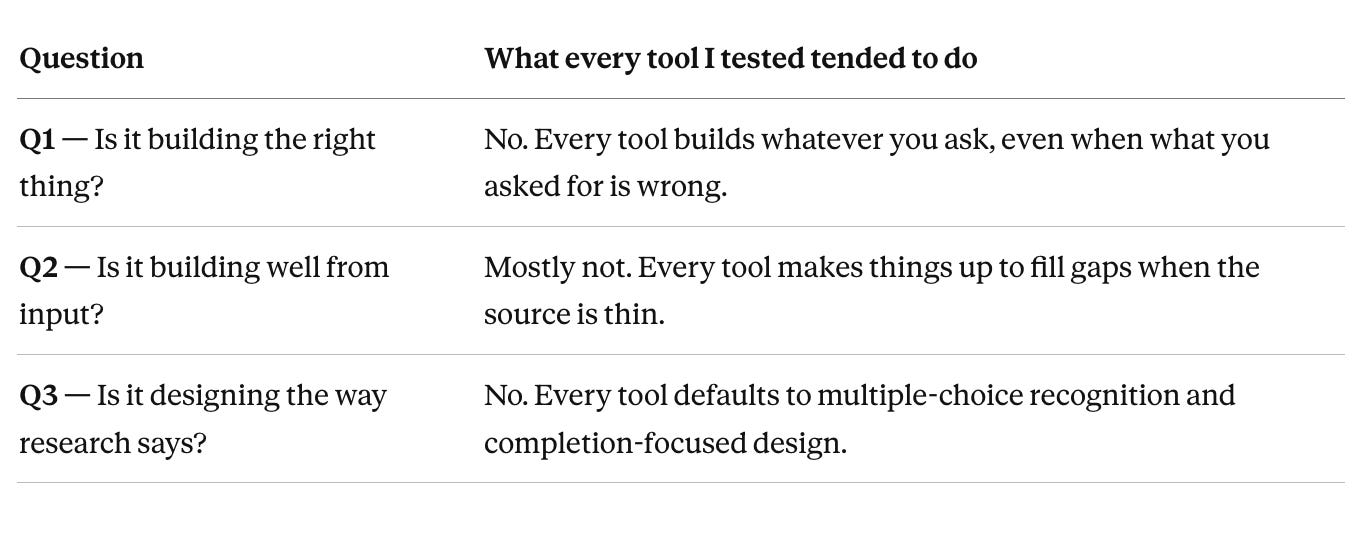
The main take away here is that from my initial tests there appears to be no meaningful gap between the quality of the outputs produced by “specialised” tools and those produced by popular general LLMs.
This suggests that what we’re paying £10K–£100K a year for isn’t “learning-design expertise baked into an AI tool” but rather production polish: rapid SCORM packaging, easy LMS integration, team workflows, consistent visual outputs.
There are real produce benefits which are worth paying for but only if production is the job you’re hiring for. And they are qualitatively different benefits from what these tools often sell: augmented design thinking and instructional design expertise.
There are two patterns which emerge from these results that are worth naming. Let’s walk you through each — and what to do about them.
AI tools are built and trained to comply. Their default position is to say yes — to build whatever you ask, from whatever you give them. While some models are getting better at this, as a rule AI doesn’t push back, it doesn’t flag problems — it complies and executes.
In the L&D context, this default behaviour is dangerous:
→ AI tools build the wrong thing when the brief is wrong.
→ AI tools make things up when the source is thin.
→ AI tools optimise for executing and finishing, not for quality / learning.
How do we mitigate these risks? Try adding three quick checks to your own workflow.
Before you ask any AI tool, specialised or general, to create anything, write one sentence: “Why is a course the right answer here, rather than a job aid, a checklist, a community, a workflow change, or nothing?”
Three sub-questions that force the issue:
→ Is this a knowing problem or a doing problem?
→ Is the gap motivation, capability, or environment?
→ What’s the lightest thing that could close it?
If “course” survives those three questions, go ahead. If it doesn’t, design something else first. This 30-second sanity check is the only brake in the system.
Before you even open an AI tool, ask: “Could a human instructional designer build this from this source without making anything up?”
If the answer is no, the AI will make things up too. Either get more source material, or use the tool as a gap-finder first (“tell me what’s missing from this material before you build anything”) rather than a gap-filler (“just build it anyway”).
Before you ship any AI-generated output, pick 6–10 specific claims from it (all of them if it’s a compliance course) and check each one against your source material.
If you can’t find a claim in the source, it came from the AI’s general training — decide on the spot whether to keep it, edit it, or cut it.
What to look for when you run the Source Check — 8 failure modes I see over and over:
→ Invented content. The tool writes about an obligation, timeline, or process that doesn’t exist — because it’s pattern-matching to what compliance content typically says, not to the actual source.
→ Phantom citations. The tool cites a study, paper, or statistic that doesn’t exist, or cites a real one but misrepresents what it found. “Research shows 73% of employees…” with no traceable source.
→ Assumed steps. The tool adds procedural steps that aren’t in the source material. Common in SOPs and technical training — the AI fills in what “usually comes next” in processes like this one, even when the source says otherwise.
→ Hallucinated specificity. The tool adds precise details — percentages, timelines, named processes — that sound authoritative but have no traceable source. Precision without provenance.
→ Scope drift. The tool quietly expands or contracts what you asked for. You specify five learning objectives, seven appear — the extras sound reasonable, but they weren’t what you asked for.
→ Confident summary of content that was never taught. The end-of-module summary includes points the module didn’t actually cover — plausible-sounding but not in the material.
→ Recursive confidence on wrong answers. Ask the tool to explain its reasoning on a claim that’s wrong, and it doubles down with more detail rather than flagging uncertainty.
→ Template collapse. When the source is thin or ambiguous, the tool falls back on a default structure regardless of whether that structure actually fits the content.
These are the patterns the Source Check is designed to catch. Most of them are invisible in the output itself — they only show up when you compare claim by claim against what the AI was actually given.
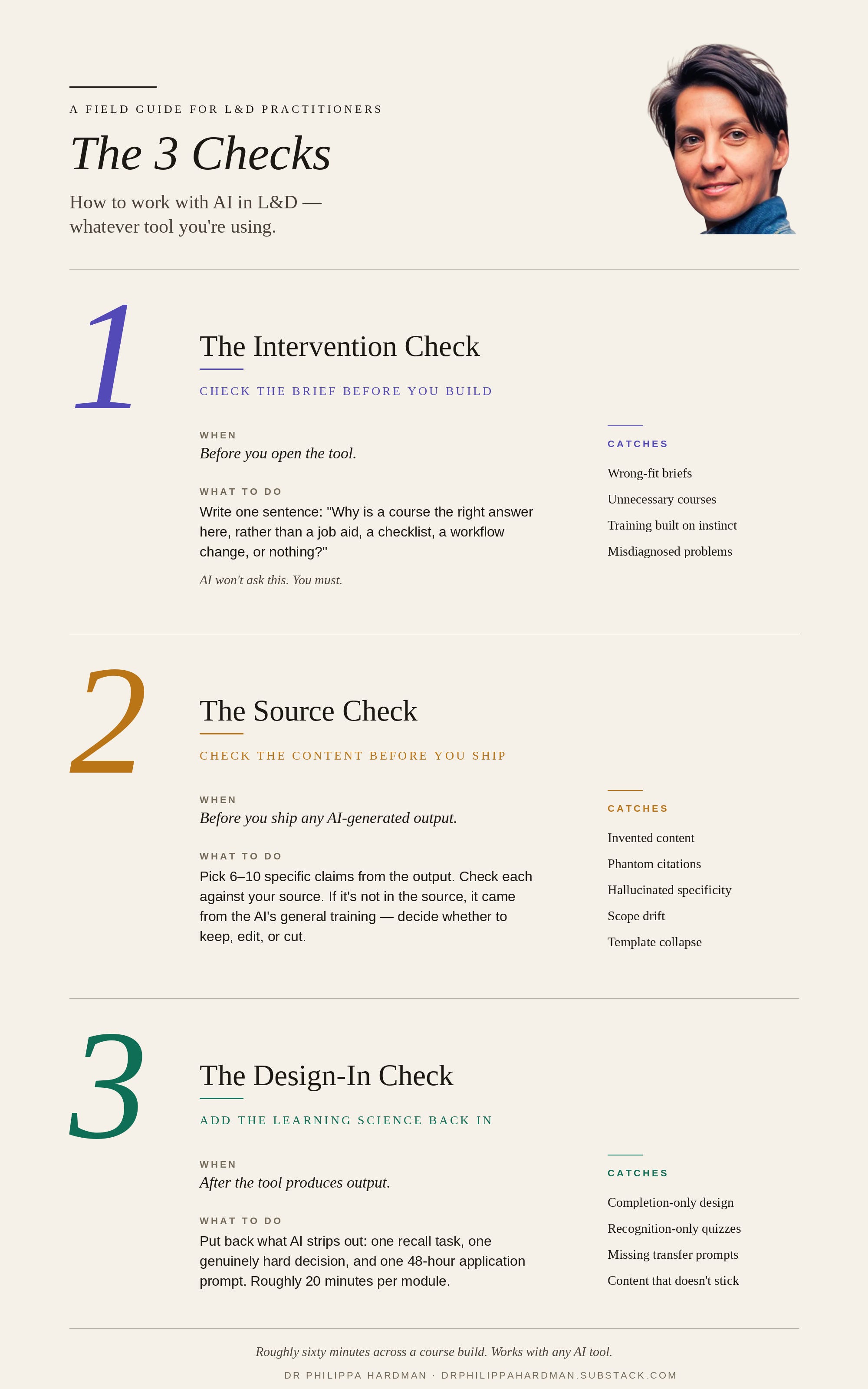
After the tool produces output, add in three things it most likely stripped out. Twenty minutes per module.
→ One recall task. Rewrite one end-of-section multiple-choice question into something like “write down the three situations where X applies, then check against the list.” The difference matters: recognition is picking the right answer from a list. Recall is producing it from memory. Recall is what makes learning stick.
→ One genuinely hard moment. Put in one decision where the right answer isn’t obvious and the learner has to actually work it out.
→ One application prompt. Add something that asks the learner to use what they’ve just learned in their actual job within 48 hours. Structurally, as part of the design — not as an optional extra at the end.
Those three moves, in that order, will increase the design quality of any AI-generated output immediately.
Every “specialised” L&D tool I tested is marketed with language that suggests it’s making strategic design decisions like an instructional design expert. In practice, almost none of them are. In reality, the instructional design skills you’re buying are roughly equivalent to what a general-purpose LLM produces out of the box.
To see this clearly, I created three definitions of what AI tools for L&D might look like / how they might work:
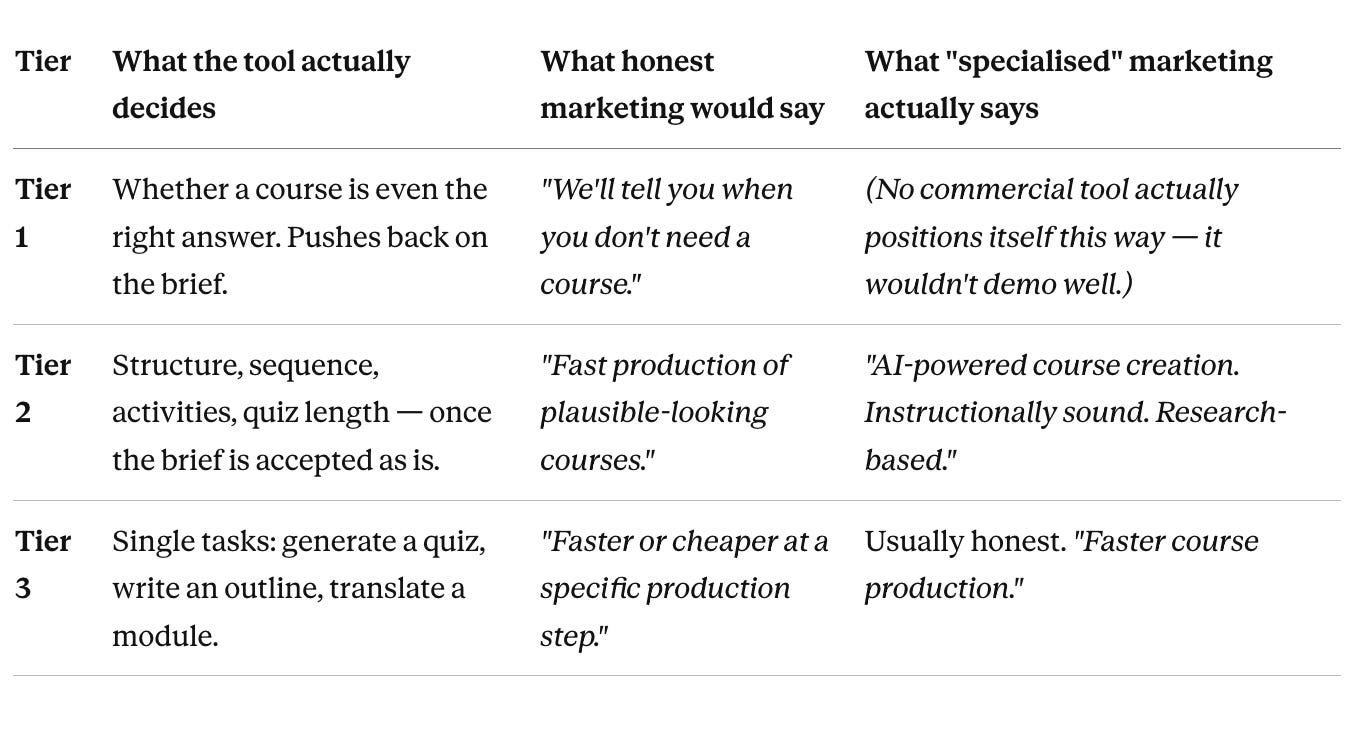
I tested all five of the most commonly used AI tools in L&D. Every one was sold as tier 1, but delivered as tier 2.
That’s The Specialisation Myth: we’re told we’re buying learning-design expertise baked into the software. There is evidence of some tuning, but the actual design reasoning underneath is the same general pattern-spotting that a frontier LLM does for more or less any topic you give it. For now at least the wrapper of AI tools for L&D is more specialised than the thinking.
You don’t need to switch or ditch tools to act on any of this, but you do need a clear picture of where each tool in your stack is strong and weak, so you can put your own judgment at the right points.
Here’s how to run the same tests I ran on your tools, in 30 minutes:
Use the same three inputs: a clean source from your organisation, a thin source of your own (6–8 bullets), and a wrong-fit brief (something procedural that shouldn’t be a course).
Score your tool on the same three questions: 0 = failed badly, 3 = nailed it.
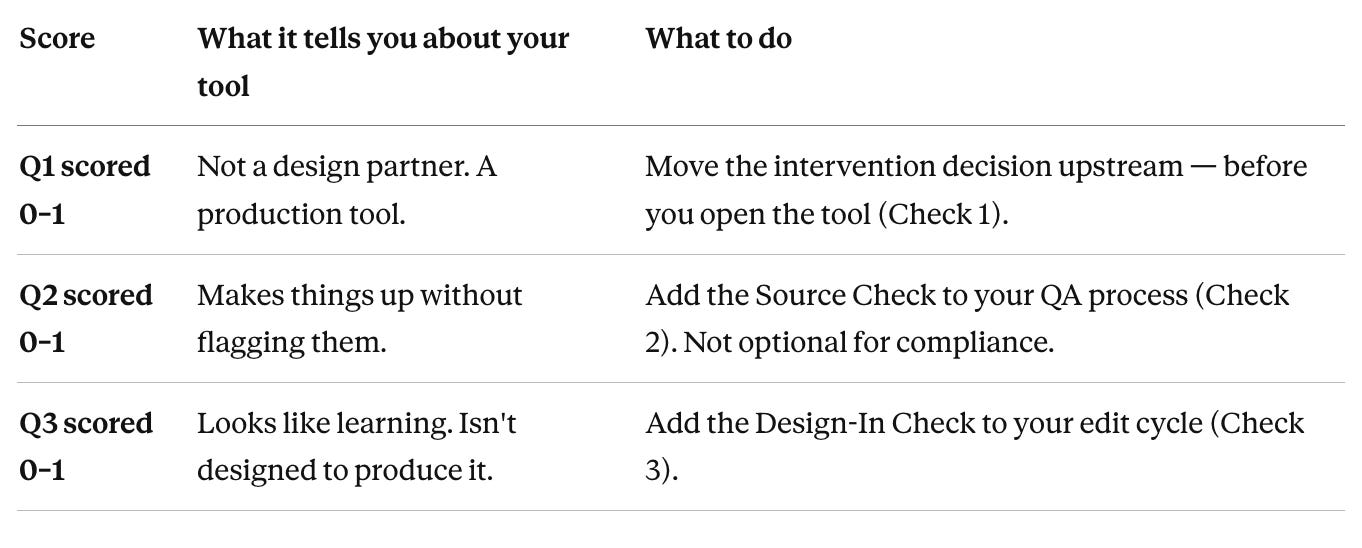
Most tools — dedicated or general — will score around 1 across the board. That’s not necessarily a crisis — it’s information. It tells you exactly where your own workflow needs to pick up what the tool misses.
Once you know “specialisation” is largely a myth, the right question stops being “which tool should I buy?” and becomes “What job am I actually hiring AI for, and how do I work around its specific weaknesses?”
Here’s the practical version.
What they’re genuinely good for:
→ SCORM and LMS integration at scale. If you need to publish courses straight into an enterprise LMS, dedicated tools handle it cleanly. A general LLM gives you text in a chat window, not a SCORM package.
→ Consistent visual output across large teams. If five people are building courses that need to look like they came from the same brand, the dedicated tool’s templates earn their keep.
→ Team workflows and handoffs. Version control, review queues, commenting, role-based access. Dedicated tools are genuinely better here.
→ High-volume production. When you’re producing 50 modules a year rather than 5, the production polish compounds.
How to work around the weaknesses:
→ Don’t trust the design layer. Use them for production only. Make your design decisions outside the tool (on paper, with a general LLM, with a colleague), then bring those decisions into the tool for production. Treat the tool’s “AI design” features as a suggestion, not a decision.
→ Run the Intervention Check before you open the tool. The specialised tool will never ask whether a course is the right answer. That’s on you.
→ Run the Source Check before you ship. The SCORM wrapper doesn’t stop the AI making things up. Check 6–10 claims against the source. Not optional for compliance work.
→ Always add the Design-In pass. The tool optimises for completion. You put recall, genuine challenge, and application back in.
🚩 Red flag to watch for: if the tool’s marketing says it’s making design decisions for you (“instructionally sound”, “research-based”, “pedagogically grounded”), be more sceptical, not less. The louder the design marketing, the more likely the tool is Tier 2 dressed up as Tier 1. Test and validate these claims.
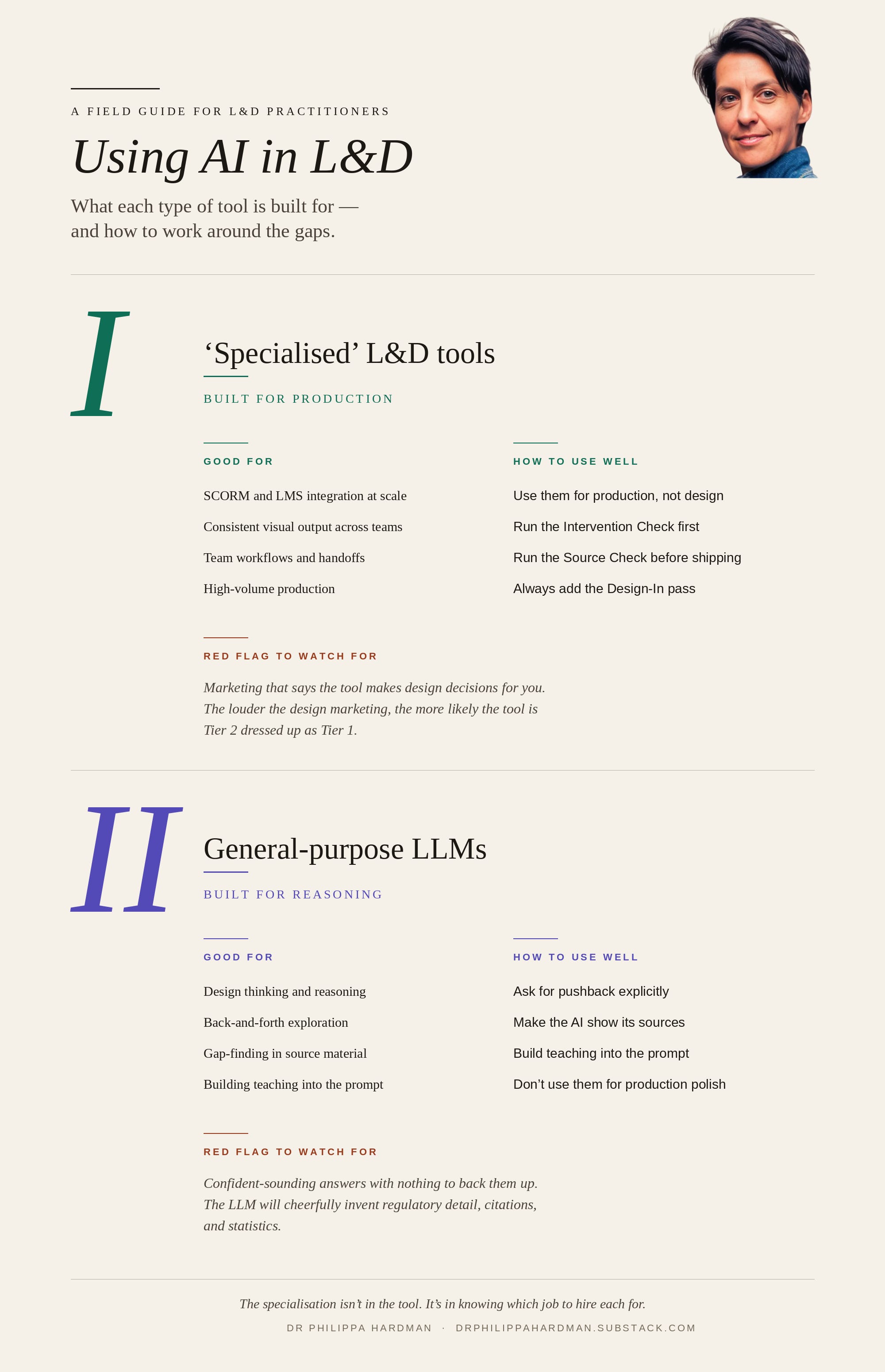
What they’re genuinely good for:
→ Design thinking and reasoning. Brainstorming different ways to solve a learning problem, pressure-testing your brief, drafting learning objectives, exploring different teaching approaches. This is where general LLMs actually shine.
→ Back-and-forth exploration. “Give me three different ways I could structure this content. Pick holes in each one.” The general LLM is much better at this kind of dialogue than any dedicated tool I’ve tested.
→ Gap-finding. Handing over your source material and asking “what’s missing if I wanted to teach this properly?” — a genuinely high-leverage use.
→ Small-scale, one-off content. When you’re producing one module and production polish isn’t the bottleneck, a general LLM plus a bit of manual polish beats a dedicated tool on both speed and quality.
→ Building your own teaching approach into the prompt. You can bake your learning-design thinking directly into the prompt — in a way you simply can’t with most dedicated tools.
How to work around the weaknesses:
→ Ask for pushback explicitly. General LLMs default to agreeing with you. Try: “Before you build anything, challenge this brief. Tell me why a course might be the wrong answer. Tell me what’s missing from my source.” That one instruction changes the output dramatically.
→ Make the AI show its sources. Try: “For every substantive claim, add a [source: page/paragraph] tag pointing to where it comes from in the material I’ve given you. If you can’t find it in my source, tag it [from general knowledge] and I’ll decide whether to include it.” This builds the source check into the output itself.
→ Build your teaching principles into the prompt. Ask for recall tasks, not just multiple choice. Ask for at least one genuinely hard decision point. Ask for a 48-hour application prompt at the end. The LLM will happily deliver all of these if you ask — it just won’t do them by default.
→ Don’t use them for production polish. They give you plain text. If you need SCORM, a branded visual system, or LMS integration, a general LLM is the wrong tool. Keep the two jobs separate.
🚩 Red flag to watch for: confident-sounding answers with nothing to back them up. The general LLM will cheerfully make up regulatory detail, research citations, and statistics. The antidote is forcing citations in the prompt and running a source check on the output — every time.
Most writing on AI in L&D is aimed at buyers: which tool, which price, which feature set. This post isn’t.
You almost certainly already have both kinds of tool in your workflow. The question isn’t whether to buy them. It’s what to assume about each, and where to put your own judgment.
Two things worth taking away:
→ Running checks has a huge payoff. The 3 Checks above are roughly 60 minutes of work across a full course build. Most practitioners aren’t doing any of them, but the ones who are will ship dramatically better work than teams using the fanciest dedicated tool without them.
→ Your judgment is the one thing getting more valuable, not less. Tools produce plausible-looking output faster every quarter. What’s getting rare — and therefore more valuable — is the human layer that catches what the tools miss. That’s the skill that compounds. That’s where the real specialisation lives.
The teams that get this right over the next twelve months will ship work that’s genuinely better than what came before. Faster production, yes — but also better quality and fully-compliant designs.
The teams that don’t will keep paying specialisation premiums, trust their tools to produce outputs they didn’t actually design, and wonder in two years why their training metrics look fine but nothing has changed on the job.
What decides between those two futures isn’t the tools we choose — it’s how we use them as the expert human in the loop.
Happy testing!
Phil 👋
PS: If you want to learn more about how to work optimally with AI, join me and a community of L&D folks like your on the AI & Learning Design Bootcamp.